Tutorials
Step 6: Painting part 1
Select a Color Pallet:
In order to begin painting your line drawing, you must first decide
what colors you are going to use. Sometimes I create color pallets that
are specific to the character that I am about to paint. I even go as
far as to naming each color to it’s appropiate usage, i.e. Julia’s
hair color, Julia’s eye’s, etc. Naming your colors will help
you tremendously, especially when you are creating a series of paintings
that will have similar colors. Also, having a custom pallet makes it
easy because you can delete the colors that you won’t use and add
new ones that you will use. Saving your color pallets is made easy in
Corel Photo Paint. Once you have your pallet saved you can always import
it into future projects. There are other times when I just use the default
color pallet, in which case I don’t even bother customizing my
pallet.
Create a New Layer:
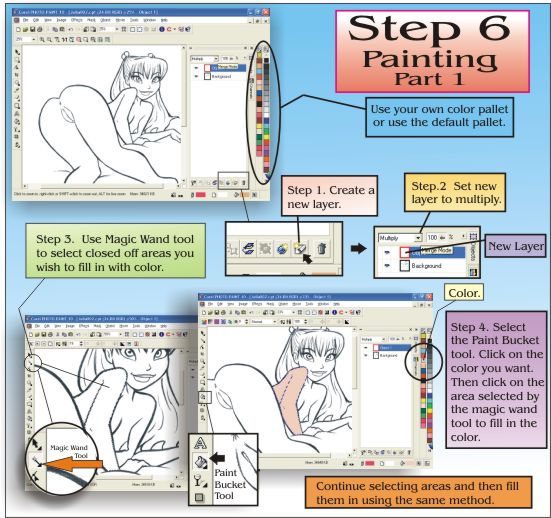
The next step is create a new layer (see image). The reason for creating
a new layer is so we can use it for the color level. Have this new layer
set at “Multiply”, in order to see your line drawing underneath.
It would be a good idea to name this new layer. Give it a name you can
easily recognize, like “color” or “tones”. There
are many ways that you can color your image. Some people just end up
flooding the entire layer with one color and then systematically replace
certain colors. You can do it that way. However, the way I did it for
this demonstration is somewhat different. Since I already have a specific
color that I am going to use, flooding the entire page with one color
wont work in this case.
Using the Magic Wand:
I paint using the magic wand tool. I just click on a closed area and
it selects just that specific area. This is great when you need to airbrush
some tones in that area only. It is also helpful when you click on an
area and it selects something else that you didn't want, because then
you know that you have a leak somewhere in your line drawing. It is
better to fix it now than to try and paint it. For this demonstration,
I have selected Julia’s left arm and part of her back. Keep in
mind that I am still working in the color layer.
Using the Paint Bucket:
The Paint Bucket tool is pretty straightforward. Choose the paint bucket
tool, pick the color you wish to fill with and click in the selected
area. Make sure you masked off the area you want to fill in with the
Magic Wand tool. The color should fill the whole area that has been
selected. Do the same with all the other areas you wish to color. The
color will only be filled in the masked area. You must select other
areas with the Magic Wand tool in order to paint them. Alternate between
your Magic Wand tool and your Paint Bucket tool as you go through your
entire drawing. Corel has made this part easy by having the spacebar
act as a switch. Pressing your spacebar will take you back to the last
tool you used and vice versa. Suffice it to say that this part is easy.
The hard part comes later.
Using the Brush Tool:
A. Filling in the remaining color
This part becomes a little harder because you will be focusing on details.
Sometimes the paint bucket tool does not fill in all the nooks and crannys,
leaving behind unfilled areas near your line. This happens because your
line either is of low quality or you’ve scanned at a low resolution
leaving your line somewhat pixelized. Do not worry yourself. All you
need is the paint brush tool and a steady hand. I always use the mouse,
even when I’m painting, so I’ve managed to control the mouse
fairly well. Some of you may use a board with a pen, that’s fine
also. However, you must learn to keep you hand steady for this proceedure.
That means no masturbating while doing this! Set your brush tool to
a sharp edge and 0% tolerance. This means that the brush will paint
with full opaqueacy. Make sure you are not using a soft edge. What you
want to do here is just fill in the flat color that remains to be filled.
B. A talk about techniques
Before you begin painting in the color, notice the gray around some
of your lines. This means that some of the color did not fill in underneath
that line. If you recall earlier that I mentioned that some people just
flood the entire page with one color and then replace those colors.
Well this tecnique usually takes care of that problem. My tecnique however
has created this problem. I use to tear my hair out before trying to
figure out how to deal with this problem. Now I can say that I have
somewhat fixed this dilema. Of course, nothing beats a drawing that
has been inked by a real inker. An inked drawing once scanned leaves
a sharp image in which all you have to do is fill in the color. I am
not an inker and I find it really hard to do. So I pencil in my drawings
which add to this problem of unfilled pixels.

C. Filling in the remaining color (continued)
Again I remind you that your hand must be steady. Lay off the coffee
and the soda. Select your color, usually the color that you have already
used for that area. Remember, you are just filling in color. Hit all
the edges with your brush. On internal lines, like Julia’s arm,
you can paint right over the line. Make sure you are still in the color
level. If for some reason you accidently switched over to the line level,
you would have effectively replace your line with a brush stroke. You
don’t want that. You want to keep your line. This is the whole
purpose of working on an entirely different level.
D. A talk about tutorials
I used to work on one level (Boy was I stupid). This limited me tremendously.
If you ever take a look at my earlier stuff you will notice some blue
mixed in with my line. That’s before I found that you can work
on different levels and still be able to see your original line underneath
all that paint. This was like a revelation to me. I don’t claim
to know all the techniques and I seriously don’t know all the techniques.
That’s why I would recomened you serious artist out there to comb
the internet for professional tutorials. I’ve been really disappointed
with the bookstores for they seem to lack anything resembling a tutorial
like this. I have found some good tutorials that have come out of Japan.
I wish I could read Japaneesse because they do some really nice CG work.
I have learned some stuff from just looking at the pictures. Other tutorials
that I would recommend are at https://pub127.ezboard.com/bcartoonandillustrationparadise66133
They are really good and seem to know their stuff.
E. Filling in the remaining color (continued)
Hopefully you understand what I am trying to convey to you. Don’t
worry about tones at this point. You are only concerning yourself with
filling in all the flat color. If you switch off the line level you
will see where you need to fill in your color. However, always work
with the line level on or visable. I do this so I can know where I can
bring my color up to. Do this until all your gray is gone. The result
will be your line underneath showing through the color on top.